
COVID 19, Remote Work, and Cyber Security
Direct answer: The fastest way to strengthen remote work security is to use a role-based checklist for management, employees, and directors that covers communication, endpoint hygiene, access control, incident response, and phishing readiness.
The article published two weeks ago titled 'Coronavirus (COVID-19) Guidance for Small and Large Businesses' listed the important points and resources the large and small organization could consider in developing an emergency plan and respond to the coronavirus emergency. Today, we are already in the middle of a situation where everyone is working from home, not just in the US but around the world. The situation creates an opportunity for hackers. The U.S. cybersecurity officials released an advisory warning to companies to update their Virtual Private Networks (VPNs) and be on guard against a surge of malicious emails aimed at an already disoriented workforce. Britain's National Cyber Security Centre issued a six-page leaflet for businesses managing remote employees.
The team at e-InnoSec thought it will be a good idea to provide a quick checklist for the organization to know if they have considered different remote work risk factors as well as management to know the areas that need quick attention. The checklist is divided into three parts and driven by the roles and responsibilities of personnel within the organization.
What should senior management check for remote work cybersecurity?
| # | Questions | Yes | No |
| 1 | Is the CEO present in online tools, channels, and is communicating proactively and engaging in timely conversations? | ||
| 2 | Has the management explained in writing what the company is trying to accomplish and has a vision that can help employees rally behind? | ||
| 3 | Has management addressed the issues raised by employees? | ||
| 4 | Is management courteous, compassionate, and authentic across channels? | ||
| 5 | Does the company have online expressions for your culture? The virtual water cooler where high fives, celebrations, gossip, community, family, personal interest, happy emojis, etc. can be shared. | ||
| 6 | Does the company have the right digital tools to facilitate communication? (E.g., Text messaging, Slack, email, wikis, hangout, video conferences, etc.) | ||
| 7 | Do the company have established security policies and guidelines for remote work? |
What should employees check for remote work cybersecurity?
| # | Questions | Yes | No |
| 1 | Is your Wi-Fi connection secure? Can you reach out to the support team to verify and test? | ||
| 2 | Is anti-virus or any updates/patches applied timely to the computer without delay? | ||
| 3 | Do you back-up periodically in addition to auto backup runs? | ||
| 4 | Do you lock your screen while away and protect them from kids? | ||
| 5 | Did you check with your support team that encryption is in place and working? | ||
| 6 | Are you familiar with applicable security guidelines, plans, and policies? | ||
| 7 | Are you aware that the work computer and other devices must not be shared? |
What should directors check for remote work cybersecurity?
| # | Questions | Yes | No |
| 1 | Do you have adequate support staff to address the questions from remote workers and resolve the issues in time? | ||
| 2 | Do you have the ability to push updates, patches, etc. and enforce timely implementation? | ||
| 3 | Can you provide virtual solutions, digital signature, and approval workflows? | ||
| 4 | Do you have clear procedures for employees to follow in case of a security incident? | ||
| 5 | Can you limit access to sensitive data where it makes sense? | ||
| 6 | Do you have a data breach and incident response plan to manage incidents? | ||
| 7 | Did you send a reminder to employees as to what information needs to be protected? (E.g., confidential, sensitive business information, trade secrets, intellectual property, private employee information, work product, customer information, and other personal information that identifies a person.) | ||
| 8 | Have you trained employees on how to detect and/or handle phishing attacks and other forms of social engineering attacks? | ||
| 9 | Do you have a policy in place to prohibit access to company information systems while on public wi-fi? | ||
| 10 | Do you have solutions in place to manage and secure mobile devices and applications? | ||
| 11 | Are you communicating with employees about coronavirus-themed phishing emails? |
What additional phishing guidance supports this checklist?
The checklist is based on the various articles and guidance recently published by Fast Company, European Union Agency for Cyber Security (ENISA), JDSPURA, BBC, CNBC, etc.
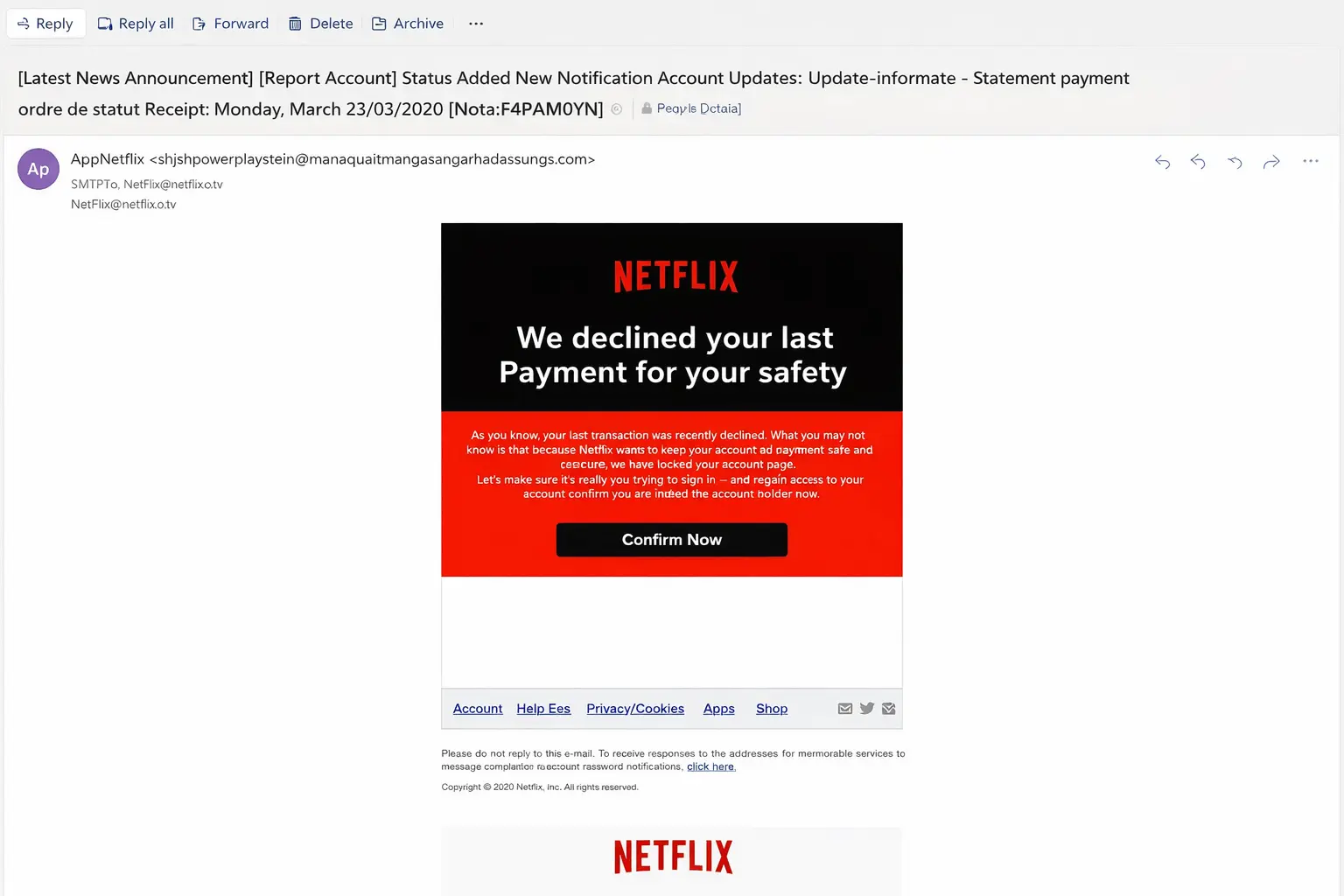
Thought of sharing a recent phishing email received few minutes ago.
Key Takeaways
- Use role-based accountability: leadership, employees, and directors each need explicit remote-work security responsibilities.
- Prioritize secure connectivity, patching, endpoint protection, backups, and device handling controls.
- Make incident response practical by defining clear employee reporting procedures and leadership escalation paths.
- Continuously reinforce phishing awareness, especially for crisis-themed social engineering campaigns.
Related Resources
Related Posts
COVID-19 Quick Remote Work Cyber Security Checklist
A practical remote-work checklist for leadership, employees, and directors with role-based controls and phishing-awareness prompts.
Read More
COVID-19 Easy Fix Remote Work Cyber Security Checklist
Use an action-oriented remote-work checklist to improve endpoint hygiene, access discipline, and incident-response readiness quickly.
Read More
Senior Mgt & Employee Responsibilities - COVID 19
Clarify management and employee security responsibilities to reduce remote-work gaps during high-risk operating periods.
Read More
GRC Insights That Matter
Exclusive updates on governance, risk, compliance, privacy, and audits — straight from industry experts.